


Vadzo Imaging Positions Falcon-234CGH: 2MP Onsemi AR0234 Color Global Shutter Autofocus USB Camera for Accurate Barcode Reading in Kiosks and Digital Signage Systems
FORT WORTH, TX / ACCESS Newswire / October 23, 2026 /Vadzo Imaging, a provider of embedded vision camera products for OEMs and system integrators, today positions the Falcon-234CGH as an AR0234 Color Global Shutter Autofocus USB Camera for accurate barcode reading in kiosks and digital signage systems. Built on the Onsemi AR0234 sensor and part of Vadzo 's USB camera portfolio, the Falcon-234CGH combines VCM-based autofocus, a global shutter, an on-board ISP, and a 74 DFOV S-Mount lens in a UVC-compliant module. With this positioning, Vadzo presents a 2MP Color Global Shutter Autofocus USB Camera for check-in, ticketing, retail, and interactive signage scanners, together with guidance on pixels per barcode module, reading distance, and the glare that phone screens create.
Why an AR0234 Color Global Shutter Autofocus USB Camera Improves Barcode Scanning
Reading a barcode with a camera looks easy and is often unreliable. The software that decodes the code needs a sharp picture with clear edges between the bars or modules, enough pixels across each module, and an exposure that keeps dark and light elements distinct. Any one of those can fail in a kiosk. Users hold paper tickets and phones at different distances, tilt them, and wave them quickly. A fixed focus lens is sharp at one distance and soft at the rest, so a code held a little too close or too far is unreadable. Autofocus is the usual cure, and it works only if the focus system is fast and settles reliably on a flat target. A camera that hunts for focus costs more time than a fixed lens ever did.
Motion is the second problem. A rolling shutter sensor reads the image row by row, and a code that moves during readout is skewed, which bends the straight edges that decoders depend on. Short exposures reduce the effect but need plenty of light. A global shutter exposes every pixel at the same instant, so the code keeps its shape however fast the user moves it. The benefit grows when kiosks serve people in a hurry, such as at a gate or a counter.
Phone screens bring a third problem. A code on a screen is a light source, not a printed surface. Its brightness can saturate the sensor, the glass reflects ceiling lamps and the user 's own face, and the screen 's refresh and brightness control can add flicker or banding to the image. A camera that exposes for the whole frame may overexpose the screen and lose the code. A camera that meters on the code itself keeps it readable, and noise reduction matters as well, since noise breaks the clean edges that decoders look for. Dim enclosures and tinted windows make that worse.
Resolution is the fourth. A decoder needs a minimum number of pixels across the narrowest element of the code, and a wide-angle lens spreads the sensor 's pixels over a large area. A camera that advertises megapixels without explaining how far it can read a given code leaves the designer unsure whether it will meet the kiosk 's needs. Teams that find these limits after enclosures are built must change lenses or housings, which is costly. A short review of the scanning distance, the code sizes, and the lighting at the start of a project avoids most of that rework.
How the Falcon-234CGH Delivers Sharp, Readable Barcode Images
The Falcon-234CGH is built on the Onsemi AR0234, a 2MP (1920 x 1200) color global shutter sensor with a 1/2.6 inch optical format and 3.0 micron pixels. The global shutter exposes every pixel at once, so moving objects stay undistorted, and the 3.0-micron pixels gather more light than the pixels of most sensors at this resolution, which lets exposure stay short. The module uses an S-Mount lens with VCM-based autofocus that supports a 74 DFOV lens. The voice coil motor moves the lens electrically and quickly, so the camera can refocus as the user brings a code toward the scanning position. A short settling time matters, because users judge a kiosk by how quickly it responds.
The on-board ISP finishes the image inside the module. It converts the raw sensor data into a processed color image and applies auto exposure, auto white balance, and denoising. Auto exposure adjusts the brightness as lighting changes, which matters in kiosks that sit near windows or under changing signage lighting, and denoising reduces the speckle that blurs code edges in dim enclosures. Auto white balance keeps colors neutral, which matters when the same camera also captures a face or an identity document. For barcode work, the ISP 's output is the frame the decoder sees, and a cleaner, steadier frame makes decoding faster and more reliable. Decoder software also benefits from frames that look the same from one unit to the next.
A worked example shows how a wide lens limits reading distance. A 74-degree diagonal lens on this sensor has a focal length of about 4.5 millimeters and a horizontal field of view of about 65 degrees. At a distance of 150 millimeters, the frame is about 192 millimeters wide, which gives about 10 pixels per millimeter. A common retail barcode has a narrowest element of about 0.33 millimeters, so it spans about 3.3 pixels, which is enough for most decoders. A smaller 0.25 millimeter code spans only about 2.5 pixels, which is marginal. A decoder needing about 3 pixels per element would read the 0.33 millimeter code out to about 165 millimeters, and no farther. A code on a phone screen usually has larger modules, so it reads more easily. These numbers are illustrative; they assume the lens can focus at the distance in question, and they show that a 74 DFOV lens is a close-range choice, so teams that need a longer reading distance should consider a narrower lens. Larger codes, such as those on phone screens or posters, read at greater distances for the same reason.
The module is UVC compliant and connects over USB 3.2 Gen1, so Windows and Linux kiosks can open it without a proprietary driver, and a single cable carries video and power. Teams should confirm the focus range, the close focus limit, and the frame rates against the Falcon-234CGH datasheet, and they should test autofocus speed on the real scanning position, with the real tickets and phones, before fixing the enclosure design. A simple jig that holds the camera at the planned position makes such tests quick to repeat.
The same arithmetic shows why phone screen codes are easier. A QR code shown on a phone is typically about 25 millimeters wide with 25 modules, so each module is about 1 millimeter. At 150 millimeters, a module then spans about 10 pixels, far more than a decoder needs. With the same lens, a code with 1-millimeter modules would still span about 3 pixels per module at roughly 500 millimeters, in principle, although the lens must be able to focus at that distance and the glare and noise issues remain. In practice, the limits for phone codes come from focus range, screen brightness, and reflections, not from pixel count, which is why exposure control and autofocus matter more than resolution for this task.
Product Overview
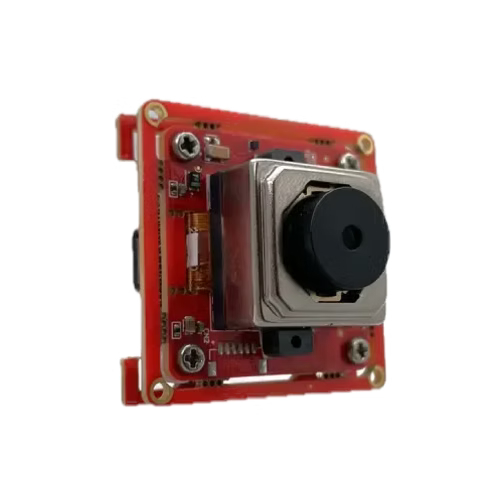
The Falcon-234CGH is a 2MP color USB module built on the Onsemi AR0234 sensor and positioned for accurate barcode reading in kiosks and digital signage systems. As a 2MP VCM Autofocus USB Camera, it focuses automatically on codes held at different distances, and as a 2MP ROI Auto Exposure USB Camera, it can meter on the region that holds the code so a bright phone screen does not wash it out. The 2MP On-board ISP USB Camera designation covers auto exposure, auto white balance, and denoising inside the module, and the AR0234 AWB Autofocus USB Camera designation covers consistent color from a camera that also focuses automatically. The module combines the sensor, the ISP, and a USB 3.2 Gen1 controller with an S-Mount lens and VCM autofocus. It also serves as a 2MP Autofocus USB 3.2 Camera, an AR0234 VCM Autofocus USB Camera, a 2MP Autofocus ISP USB Camera, and an AR0234 Color VCM Autofocus Camera for designs that need a standard interface.
Key specs: 2MP (1920 x 1200) Max Resolution | Onsemi AR0234 1/2.6 inch Sensor Format | 3.0 micron Pixel | Color with Global Shutter | USB 3.2 Gen1 Interface | S-Mount (M12) VCM Autofocus Optics with 74 DFOV Lens
Key Capabilities of the AR0234 Color Global Shutter Autofocus USB Camera
S-Mount Lens with VCM-Based Autofocus
The module carries an S-Mount lens with voice coil motor autofocus that supports a 74 DFOV lens. The S-Mount format keeps the optics small and lets integrators choose among lenses, while the voice coil motor moves the lens quickly and electrically, with no manual adjustment after installation. A 74 DFOV lens gives a wide view at close range, which suits a scanning position a hand 's length from the camera. Teams that need a longer reading distance can ask Vadzo about narrower lenses, and the close focus limit should be confirmed against the datasheet. Vadzo can also review the mechanical placement of the lens behind a window.
Autofocus Performance at the Barcode Scanning Position
Users do not hold a ticket or a phone at one fixed distance, and they move closer when the first attempt fails. An autofocus camera follows that movement and brings the code into focus, which cuts the number of retries. A 2MP Color Global Shutter Autofocus USB Camera of this kind reads codes across a range of distances where a fixed focus lens reads them at only one. Teams should test the speed and stability of focus on a flat, high-contrast target at the real scanning position, since a kiosk should not hunt for focus, and they should repeat the test with curved and glossy tickets, which are harder to focus on than flat paper. Recording the time to focus over many attempts gives a reliable picture.
Global Shutter Capture for Motion-Free Barcode Images
A hand moving a ticket toward a scanner, or a phone swung into view, creates fast motion at close range. A global shutter exposes every pixel at the same instant, so the code stays rectangular, and the decoder sees straight edges. The 3.0 micron pixels also let exposure stay short without losing signal. As a 2MP Global Shutter Barcode USB Camera, the module suits fast-moving, close-range codes better than a rolling shutter camera of the same resolution. Handheld scanning by customers is the clearest case.
On-board ISP for Image Processing
The on-board image signal processor finishes the picture inside the module, so the kiosk computer receives a processed frame and does not spend its own capacity on color and exposure control. An AR0234 On-board ISP USB Camera applies the same processing on every unit, which keeps behavior consistent across a fleet of kiosks. Teams that want raw data and custom tuning should discuss a raw sensor module with Vadzo instead. For most kiosk projects, finished frames from the first day shorten development.
Auto Exposure Control for Phone Screen Glare and Kiosk Lighting
Kiosks sit near windows, under signage lighting, and in dim corners, and phone screens add their own bright light. Auto exposure adjusts brightness as the lighting changes, and a region-of-interest-based approach keeps the code correctly exposed even when a bright screen fills part of the frame. A 2MP ROI AE Autofocus USB Camera setup places the metering region over the scanning area, so the code stays readable. Anti-glare coatings and the angle of the camera window also help, and Vadzo can advise on the enclosure. A matte surface around the camera window can also reduce reflections of the user 's own clothing.
Auto White Balance and Noise Reduction for Clear Images
Barcodes do not need color, but a kiosk camera often does other work too, such as capturing a face or an identity document, and auto white balance keeps those images natural under mixed lighting. Denoising reduces the speckle that appears in dim enclosures and blurs the edges of a code. A 2MP AWB Autofocus USB Camera that denoises inside the module delivers cleaner frames to the decoder, and cleaner frames decode faster. The effect is most noticeable on small printed codes.
USB 3.2 Gen 1 and UVC Compatibility for Kiosk Integration
The module connects over USB 3.2 Gen1 and enumerates as a UVC device on Windows and Linux, with no proprietary driver, which makes it a Color USB Camera Module that opens like any standard camera. As a USB Color Camera Module with an S-Mount lens, it fits compact kiosk housings. As a 2MP Autofocus USB Camera Manufacturer, Vadzo supports lens matching, firmware customization, and enclosure design for volume programs, and its AR0234 USB 3.2 Gen 1 Autofocus Camera range keeps the same documentation from evaluation to production. Kiosk makers that standardize on one module simplify spares and support across many sites.
"Kiosk makers rarely complain about the megapixel count. They complain that codes do not scan on the first try. A code can be out of focus, blurred by a moving hand, washed out by a phone screen, or simply too small in the frame. The Falcon-234CGH was positioned around those four problems. Autofocus follows the code, the global shutter freezes the motion, and the on-board ISP keeps exposure and noise under control. We also give customers plain numbers. A wide 74 DFOV lens is a close-range choice, and we help them calculate how far a given code will read. Then we ask them to test with real tickets and real phones. " - Alwin Vincent, Product Manager, Vadzo Imaging.
Barcode Scanning Applications in Kiosks and Digital Signage Systems
Check-In and Ticketing Kiosks
Airport, event, and transit kiosks read boarding passes and tickets from paper and from phone screens, often under bright lighting and with users in a hurry. The Falcon-234CGH works as an Accurate Barcode Reading USB Camera that focuses on the code at the distance the user holds it and keeps a bright screen from washing it out, and as a Barcode Reading Kiosk USB Camera it delivers decoder ready frames over a single cable. Short queues depend on first-time reads, so autofocus and a global shutter pay off quickly. Operators also gain from fewer assisted check-ins at the desk.
Retail and Self Service Kiosks
Self-service kiosks scan coupons, loyalty cards, product codes, and phone-based offers. The module serves as a Kiosk Barcode Reader USB Camera that reads both printed and on-screen codes and can also capture a photo or a document with consistent color. Designers should test with the real range of codes, since small printed codes and phone codes behave differently, and they should choose the lens for the reading distance, the window size, and the position of the user 's hand. Self-service kiosks that also read identity documents benefit from the same autofocus.
Interactive Digital Signage
Interactive signage invites passersby to scan a code and continue on their phone, or to present a pass at an entry display. The camera functions as a Digital Signage Barcode USB Camera behind the display glass, and as a Digital Signage Systems USB Camera, it needs only a standard USB connection. Glass in front of the camera adds reflections, so the camera window, its angle, and any coating should be tested with the real display lighting, including the glare from the signage content itself, which can change as the playlist rotates. A cover glass with an anti-reflective coating is a common remedy.
Frequently Asked Questions
Q: How many pixels does a camera need across each barcode module?
A:Vadzo Imaging suggests planning for at least three pixels across the narrowest element of a code, which is the width of the thinnest bar or module. Two pixels can work with a good decoder and a clean image, but it leaves little margin. The pixel count per element depends on the sensor, the lens field of view, and the distance. Vadzo Imaging helps teams calculate it for their lens, and a 2MP Global Shutter Barcode USB Camera with a narrower lens reads smaller codes at a longer distance, while a wider lens trades distance for a larger field of view.
Q: Why do barcodes on phone screens sometimes fail to scan?
A:A phone screen is a light source, so its brightness can saturate the sensor, and the glass reflects room lights and the user 's face. A camera that exposes for the whole frame may overexpose the screen and lose the code. Metering on the region that holds the code keeps it readable, and denoising helps keep edges clean. A Kiosk Barcode Reader USB Camera that handles these issues in its ISP reduces failed scans, and Vadzo Imaging recommends testing with real phones, in the real lighting, at several screen brightness settings.
Q: Why use autofocus instead of a fixed focus lens in a kiosk scanner?
A:Users hold tickets and phones at different distances and move closer when the first attempt fails. A fixed focus lens is sharp at one distance only, so many positions give a soft image. A voice coil motor autofocus follows the code and brings it into focus, which reduces retries. Vadzo Imaging recommends testing focus speed and stability at the real scanning position, since a kiosk should not hunt for focus in front of a waiting customer. A short settling time matters as much as the focus range.
Q: Does a barcode reading camera need to be a color camera?
A:No. Barcode decoding works on brightness and contrast, so a monochrome camera can do the job. A color camera is useful when the same kiosk also captures a face, an identity document, or a product photo, and it lets one module serve several tasks. Vadzo Imaging offers both color and monochrome modules, and it helps teams choose according to what the kiosk must do. A Color USB Camera Module simply adds flexibility, and a color VCM autofocus camera of this kind lets one module serve scanning and photo capture.
Q: Why should kiosk makers choose Vadzo Imaging as their 2MP Autofocus USB Camera Manufacturer?
A:Vadzo Imaging offers more than a camera module built around a capable sensor. Kiosk makers working with Vadzo Imaging receive a module with voice coil autofocus, a global shutter, and an on-board ISP, along with plain numbers on reading distance and candid guidance on what a 74 DFOV lens can and cannot do, plus engineering support for lens selection, firmware customization, and enclosure design. Vadzo Imaging maintains evaluation kits with no minimum order requirement, so teams can test with real tickets and phones before committing to volume production.
Availability
The Falcon-234CGH AR0234 Color Global Shutter Autofocus USB Camera built on the Onsemi AR0234 sensor is available now for evaluation and production orders. Evaluation kits include the camera module, the S-Mount autofocus lens, a USB cable, and platform documentation, with no minimum order requirement. Kiosk teams can test autofocus speed, reading distance, and phone screen performance with their own tickets, codes, and decoder software before committing to a production bill of materials, which tells them more than a datasheet comparison alone. Teams that need a narrower or wider lens can ask Vadzo to review the configuration. Browse the full range of USB camera options at Vadzo 's website or contact Vadzo at support@vadzoimaging.com to request an evaluation unit or discuss OEM integration requirements for kiosk and digital signage barcode reading programs.
About Vadzo Imaging
Vadzo Imaging is a global provider of embedded vision solutions and delivers high-performance camera technologies and imaging platforms for applications in robotics, industrial automation, UAVs, edge AI, and medical systems. Its products are designed for seamless integration with leading embedded platforms. Vadzo supports customers through hardware customization, firmware development, and module-level drivers, enabling faster development and deployment of vision-based systems across USB, MIPI, GigE, Wi-Fi, and SerDes camera interfaces.
Media Contact
Alwin Vincent
Vadzo Imaging
Email: alwin@vadzoimaging.com
LinkedIn: Vadzo Imaging
YouTube: Vadzo Imaging
X: Vadzo Imaging
SOURCE:Vadzo Imaging
View the original press release on ACCESS Newswire
© 2026 ACCESS Newswire. All Rights Reserved.